
How to Identify the Right Software Requirements for Your Business
Choosing software for a business is rarely just about finding a platform with the most features. The real challenge is understanding what your business actually needs from that software. Many businesses start the process by looking at different software products, comparing feature lists, checking prices, and asking which platform is the most popular. But this approach can create problems later. A system may look impressive during a demo but still fail to fit the way your team actually works.
The better approach is to identify your software requirements before deciding on a solution. Software requirements define what a system needs to do, who will use it, what information it needs to handle, which processes it should support, and how it should work with your existing business systems. When these requirements are clear, it becomes much easier to evaluate software, communicate with developers, estimate project scope, and make better technology decisions.
Whether you are purchasing ready-made software, replacing an existing system, or planning custom software development, understanding your requirements should be the starting point.
Start With the Business Problem
The first question should not be, “Which software should we buy?” It should be, “What problem are we trying to solve?” This sounds simple, but businesses often skip this step. They start looking at software because a particular tool is popular or because another company is using it. The problem is that every business has different processes, teams, customers, and operational requirements.
For example, a company may say that it needs a new CRM. But the actual problem could be that sales information is spread across spreadsheets, customer conversations are difficult to track, follow-ups are inconsistent, or management cannot get a clear view of the sales pipeline.
In that situation, simply buying another CRM may not solve the underlying problem. Start by documenting the problems your team is experiencing today. Look at where information gets lost, where employees spend unnecessary time, where customers experience delays, and where different systems or departments fail to work together. The clearer the problem, the easier it becomes to define the right software requirements.
Understand How Your Business Works Today
Before deciding what software should do, understand how work currently moves through your business. Map the important processes from beginning to end. For example, a typical sales process may look like this: A new inquiry comes in, the sales team contacts the prospect, the prospect is qualified, a quotation is prepared, discussions take place, the deal is approved, and the customer is handed over to another team.
Every step involves information, people, decisions, and sometimes different software systems. Documenting this process helps identify where software needs to support your team. You may discover that the problem is not simply the absence of software. You may need better data management, integration between systems, customized screens, approval processes, notifications, user permissions, or a more structured workflow.
This is why software requirements should be based on actual business processes rather than assumptions.
Identify Who Will Use the Software
A system that works well for one department may not work well for another. Make a list of the people who will use the software and understand what each group needs from it. Sales employees may need access to leads, customer information, opportunities, quotations, and follow-up activities. Managers may need dashboards, reports, approvals, and performance information. Operations teams may need order details, customer requirements, internal tasks, and status updates.
Management may need a completely different view of the same information. These differences should be included in the requirements from the beginning. It is also important to understand the technical ability of the users. A system can have powerful capabilities but still create problems if it is unnecessarily complicated for the people expected to use it every day. The goal is not simply to build software with many functions. The goal is to build or select software that people can actually use effectively.
Separate Must-Have Features From Nice-to-Have Features
One of the easiest ways for a software project to become complicated is to treat every requested feature as equally important. Instead, divide requirements into categories.
- Must-have requirements are functions the business cannot operate without.
- Important requirements improve the process significantly but may not prevent the system from working if they are not available immediately.
- Nice-to-have requirements are useful additions that can potentially be introduced later.
For example, a business may need customer management, sales pipeline tracking, user permissions, and reporting from day one. Advanced dashboards or additional customization may be useful later. This prioritization helps control project scope and budget. It also makes discussions with software developers much clearer. Instead of saying that the business needs “a powerful system,” you can explain exactly what the system must accomplish.
Define the Information the Software Needs to Manage
Data is one of the most important parts of any business software system. Before selecting or developing software, identify what information the business needs to collect, store, update, search, and report on. Depending on the business, this could include:
- Customer information
- Lead details
- Sales opportunities
- Product information
- Orders
- Invoices
- Employee information
- Service records
- Documents
- Communication history
- Payment information
- Operational records
You should also consider where this information currently exists. If customer information is stored in one system, sales information in another, and operational records in spreadsheets, the software requirements may need to include integration or data migration. This is an important distinction. A software project is not only about creating screens and features. It is also about creating a reliable way to manage business information.
Think About Integrations Early
Modern businesses rarely operate with just one software system. A company might use a CRM, accounting platform, ecommerce system, website, payment service, communication tools, scheduling software, and internal applications. If these systems need to exchange information, integration should be considered during the requirements stage.
For example, if a new customer is added to the CRM, does another system need that information? If an order is created on the website, should it become available to the sales or operations team? If payment information changes, does another application need to know about it?
These questions help define integration requirements. Ignoring integrations until the end of a project can create additional development work and unexpected costs. Identifying them early gives developers and implementation teams a clearer understanding of the complete system.
Consider User Permissions and Access
Not every employee should necessarily have access to every piece of information. Software requirements should therefore include user roles and permissions. For example, sales employees may be able to view and update their own customers, while managers may need access to the entire sales pipeline. Finance employees may require access to financial information that other departments should not see.
You should identify:
- Who can view information
- Who can create information
- Who can edit information
- Who can delete information
- Who can approve actions
- Who can access reports
- Who can manage users and settings
Defining these requirements early helps create a more secure and organized system.
Decide What Should Be Automated
Not every business activity needs automation, but repetitive processes can often benefit from it. Look for activities where employees repeatedly perform the same steps. For example, a business may manually assign new inquiries, send internal notifications, update records, create follow-up activities, or move information between systems.
Instead of simply saying, “We need automation,” describe the exact process. For example: “When a new qualified lead is added, assign it to the appropriate salesperson and notify the sales manager.” This type of requirement is much easier to understand, develop, test, and measure. It also prevents businesses from adding automation simply because it sounds useful. Automation should support a clearly defined business process.
Think About Reporting and Decision-Making
Software should not only help employees complete tasks. It should also help management understand what is happening in the business. Consider what information managers need to make decisions. You may need reports related to sales performance, customer activity, operational performance, revenue, inventory, service activity, or other business metrics. Think about the questions management currently asks. For example:
- “How many opportunities are currently open?”
- “Which sales stage has the most deals?”
- “How many customers were added this month?”
- “Which team is handling the highest number of cases?”
- “If these questions require employees to manually collect information from multiple sources, the reporting requirements should address that problem.
Clear reporting requirements can make a significant difference when selecting or developing business software.
Consider Future Growth
Software requirements should reflect both current needs and reasonable future requirements. This does not mean trying to predict everything the business may need over the next ten years. That can make a project unnecessarily complicated.
Instead, consider how the business is expected to grow. Will there be more employees? More customers? More locations? More products? More transactions? Additional departments? A system that works for a small team may become difficult to manage when the business grows. Scalability should therefore be part of the requirements discussion. The software should be able to support reasonable growth without forcing the business to completely replace its systems every time operations expand.
Decide What Can Be Standard and What Needs Customization
One of the most important decisions is determining whether existing software can meet the requirements or whether customization is necessary. Ready-made software can be a practical choice when its existing functionality matches the business process.
However, businesses sometimes have processes that are too specific for standard software. In these situations, customization or custom software may be worth considering. The important thing is to make this decision based on requirements rather than preference.
If a standard platform meets most of the important requirements with minimal changes, it may be sufficient. If critical processes require extensive workarounds, multiple disconnected tools, or constant manual intervention, a customized solution may deserve consideration. This is where software consulting can be particularly valuable. An experienced technology partner can help evaluate the requirements and determine what should be configured, integrated, customized, or developed.
Document the Requirements Clearly
Once the requirements have been identified, document them. A requirements document does not have to be unnecessarily complicated. It should clearly explain what the software needs to accomplish. A useful requirement might look like:
- Requirement: Sales representatives should be able to view all open opportunities assigned to them.
- Reason: Sales representatives currently use spreadsheets to track open opportunities.
- Priority: Must have.
- Users: Sales representatives and sales managers.
This provides much more clarity than simply writing, “Sales management.” For larger projects, requirements can be organized into functional requirements, technical requirements, integration requirements, security requirements, reporting requirements, and user experience requirements. The level of detail should match the size and complexity of the project.
Validate Requirements With the People Who Actually Use the System
Management may approve a software project, but employees are often the people who understand the day-to-day process best. Before finalizing requirements, speak with the people who actually perform the work. Ask them what slows them down, what information they need, which steps they repeat, what they currently do manually, and what problems they face with existing software. This can uncover requirements that may otherwise be missed. It also creates better alignment between management and users. A software system should solve real operational problems, not simply reflect what someone assumes the business needs.
Review the Requirements Before Choosing the Software
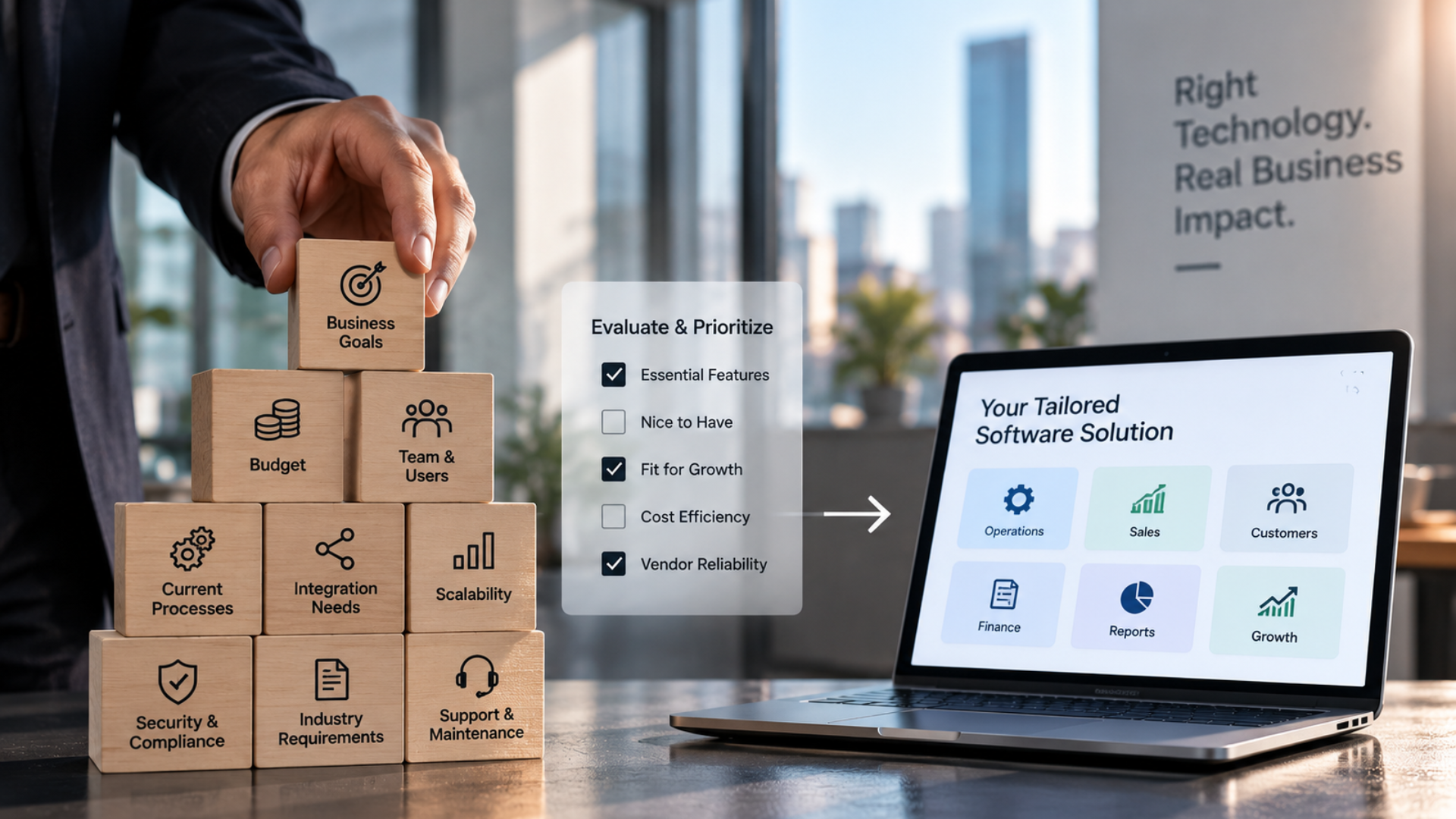
Once the requirements are documented and prioritized, use them to evaluate potential software. Instead of asking, “Which software has the most features?” ask, “Which software meets our important requirements?” Create a comparison based on the things that actually matter to your business. Consider functionality, integrations, customization, usability, scalability, security, implementation requirements, support, and total cost. This approach helps prevent businesses from choosing software simply because it has an impressive feature list. The right software is the one that fits the business requirements, not necessarily the one with the longest list of features.
What Happens When Requirements Are Not Defined Properly?
Poorly defined software requirements can affect the entire project. A business may choose the wrong platform, underestimate development requirements, discover missing functionality late in the project, or spend additional money on changes that could have been identified earlier.
Users may also become frustrated if the final system does not match their actual workflow. In some cases, the software itself may work exactly as designed. The problem is that the original requirements did not accurately describe what the business needed. That is why requirements gathering is not a minor step before software development. It is one of the foundations of the project.
How Twister Automation Helps Businesses Define Software Requirements
At Twister Automation, the starting point is understanding the business and its processes rather than simply recommending software. Businesses often come with a specific requirement such as a CRM, custom application, integration, or automation. But before deciding on the technology, it is important to understand how the existing systems work, where information is stored, how teams operate, and what the business is trying to improve.
Twister Automation works with businesses on software consulting, CRM implementation, CRM development, system integration, and customized technology solutions. This makes requirements an important part of the process. By looking at the business process first, the technology solution can be planned around actual operational needs.
Depending on the project, this may involve determining which existing software can be retained, where systems need to be connected, which processes require customization, and where a more tailored software solution may be appropriate. The objective is to help businesses build or implement systems that support the way they actually work.
Wrapping It Up
The right software requirement is not simply a list of features. It is a clear understanding of what your business needs the software to accomplish. Before choosing a platform or starting development, take the time to understand the problems you are solving, the processes you need to support, the people who will use the system, the information you need to manage, the integrations you require, and the way your business may grow.
When these requirements are clearly defined, software decisions become much easier to evaluate. You can compare solutions based on your actual needs, communicate more effectively with developers, control project scope, and avoid investing in technology that does not fit your business. The goal should not be to find software with the most features. It should be to find or build software that solves the right problems for your business.