
How to Automate Your Customer Support Workflow
Customer support becomes difficult to manage long before most businesses realize they have a process problem. When the number of customers is small, a support request can arrive through email, WhatsApp, a phone call, or even a direct message to an employee, and someone on the team will usually remember to handle it. There may be no formal ticket, priority level, assignment rule, or escalation process because the team is small enough to coordinate informally.
That approach becomes harder to maintain as the business grows. More customers mean more questions, technical issues, complaints, billing queries, and service requests arriving throughout the day. Some problems need immediate attention, while others can wait. Certain requests require the finance team, others belong with technical support, and some need approval from a manager before anything can be done. When all of these requests are managed manually, employees spend a significant amount of time deciding where each issue should go and remembering what needs to happen next.
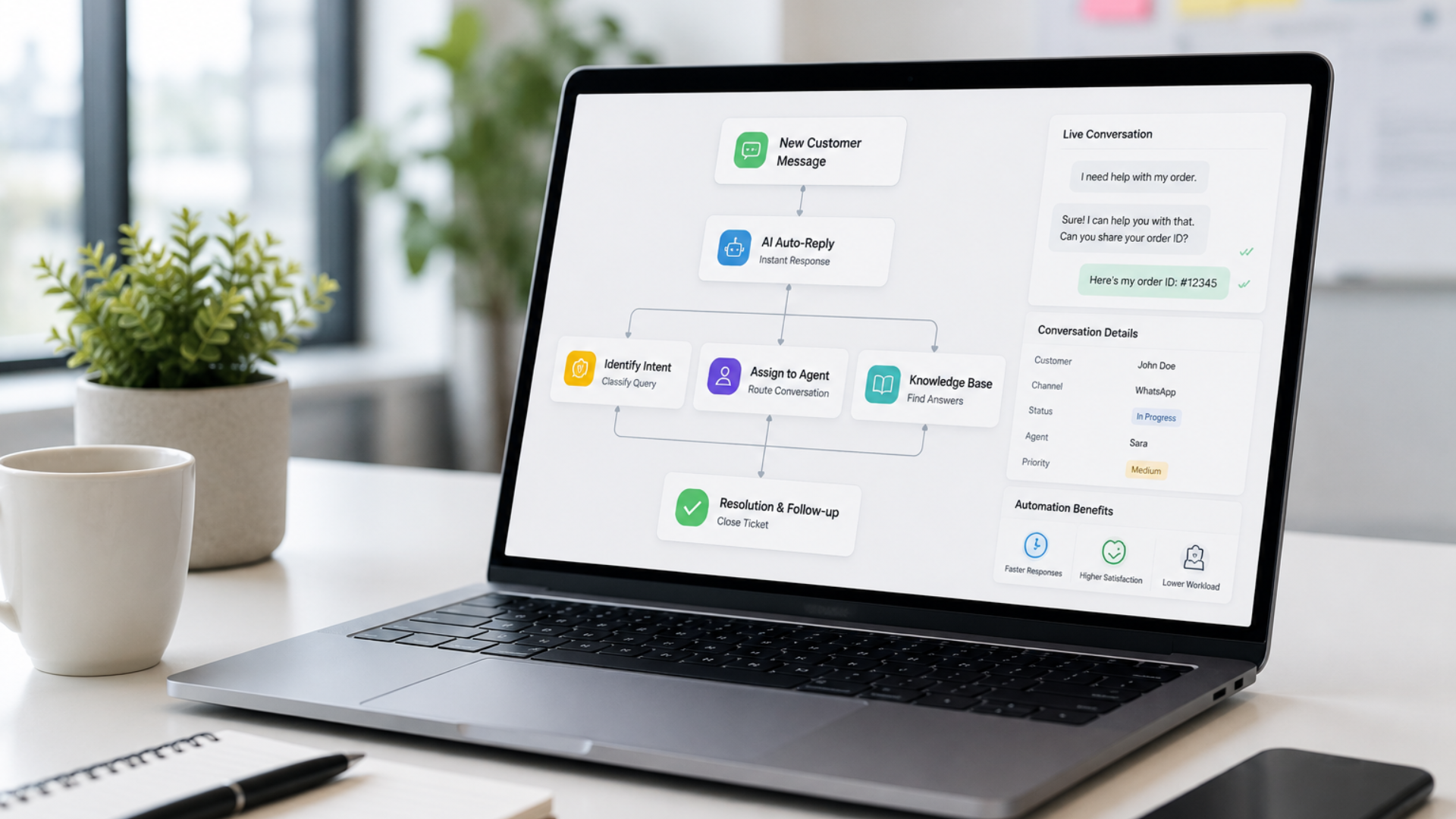
This is where customer support workflow automation becomes useful. Rather than asking employees to manually coordinate every stage of every support request, businesses can create workflows that automatically perform routine actions based on predefined conditions. A request can be recorded, categorized, prioritized, assigned, monitored, escalated, and eventually closed through a structured process while the support team concentrates on solving the customer’s actual problem.
Automating customer support doesn’t mean removing people from customer service. Good support often requires judgment, technical knowledge, patience, and human understanding. Automation is most valuable when it handles the repetitive coordination surrounding those conversations so employees have more time to provide the assistance customers actually need.
In this blog, we’ll walk through how businesses can automate their customer support workflow step by step, from understanding the existing process to creating assignment rules, escalation workflows, automated updates, integrations, and reporting.
What Is a Customer Support Workflow?
A customer support workflow is the sequence of steps a business follows from the moment a customer asks for help until the issue is resolved and closed. Depending on the organization, that process may involve several employees, departments, systems, and approval levels.
A straightforward workflow might begin when a customer submits a support request. The issue is recorded as a ticket, assigned to an available support agent, investigated, resolved, and then closed. A more complex business may need additional steps such as categorization, priority assessment, specialist assignment, manager approval, escalation, customer confirmation, and post-resolution feedback.
The problem is that many companies have a support workflow without realizing it. The process exists, but it lives inside employee habits rather than a clearly defined system. One employee knows that billing questions should be forwarded to accounts, another remembers which technician handles a particular product, and a manager personally follows up whenever an important customer complains.
This works until someone is unavailable, a new employee joins, or support volume increases. At that point, the weaknesses in the process become visible through missed requests, slow responses, repeated follow-ups, inconsistent service, and customers having to explain the same issue several times.
Workflow automation takes those informal decisions and turns them into clear, repeatable rules. Instead of relying on employees to remember every next step, the system helps move each request through the appropriate support process.
Step 1: Understand How Support Requests Reach Your Business Today
Before automating anything, businesses need to understand what currently happens when a customer asks for help. Automating a poorly understood process usually makes the same problems happen faster rather than solving them.
Start by identifying every channel customers use to contact the business. Support enquiries might arrive through email, website forms, WhatsApp, phone calls, live chat, social media, or a customer portal. Some companies also receive requests directly through account managers or sales representatives, particularly in B2B environments.
The next step is mapping what happens after the request arrives. Who reads it first? Is it recorded anywhere? How does the employee decide who should handle it? How is the customer updated? What happens if the assigned person doesn’t respond? How does management know whether the issue was eventually resolved?
This exercise often reveals gaps that aren’t obvious during daily operations. A business may discover that website enquiries are recorded properly while WhatsApp support requests remain inside conversations. Another may find that support tickets are created consistently but there is no formal escalation process when they remain unresolved.
The objective at this stage isn’t to add technology. It is to understand the real customer support journey from beginning to end. Once the process is visible, businesses can decide which parts require human judgment and which can be handled automatically.
Step 2: Bring Support Requests Into a Structured System
One of the most common reasons customer issues get missed is that they exist in too many places. An employee may have one request in their inbox, another inside WhatsApp, several tickets in a support platform, and a customer complaint forwarded by a colleague through an internal message.
When support information is scattered, managers struggle to understand how many unresolved issues actually exist. Employees may accidentally duplicate work, while customers sometimes receive different answers depending on which team member they contact.
A structured support process gives every request a clear record. Once an issue enters the system, the team should be able to see who raised it, when it arrived, what the customer needs, who is responsible for handling it, and what its current status is.
For many businesses, this means using a ticketing or CRM based support system where customer requests become trackable records rather than remaining individual messages. Twister Automation can help businesses configure these processes using solutions such as Zoho and customized workflow systems based on the way the organization actually operates.
Centralization doesn’t necessarily mean customers must use only one communication channel. They should still be able to contact the business through convenient channels. The important difference is that those interactions are brought into a process the support team can consistently manage.
Step 3: Categorize Requests So They Follow the Right Process
Not every support request should follow exactly the same workflow. A password reset, billing dispute, product defect, delivery complaint, and complete service outage require very different levels of attention.
This is why categorization is an important part of customer support automation. Businesses can define categories based on the types of enquiries they regularly receive and then use those categories to determine what should happen next.
An IT services company, for example, might use categories such as hardware, software, network, account access, cybersecurity, and billing. An eCommerce business may categorize requests into delivery, returns, refunds, damaged products, payments, and product information. A property management company might separate maintenance requests, payment issues, tenant enquiries, documentation, and emergencies.
Once these categories exist, workflow rules can begin making useful decisions. Billing issues can automatically reach the finance team, technical problems can be assigned to support specialists, and urgent service interruptions can follow an escalation process.
The categories should remain practical rather than becoming unnecessarily detailed. If employees need to choose between thirty similar options before creating a ticket, the system creates additional work instead of reducing it. The objective is to create enough structure to route requests accurately while keeping the process easy for both employees and customers.
Step 4: Define Priority Levels Before Everything Becomes Urgent
In an unstructured support environment, almost every customer wants their issue handled immediately. Internally, employees may also mark requests as urgent simply because a customer has followed up several times. Without clear priority rules, support teams end up reacting to whoever asks the loudest rather than focusing on the issues with the greatest impact.
Successful support workflows define what different priority levels actually mean.
A low-priority request might involve a general product question that doesn’t prevent the customer from using the service. A medium-priority issue could affect a specific function but have an available workaround. A high-priority issue may significantly disrupt the customer’s operations, while a critical issue could involve a complete outage or a problem affecting multiple users.
These definitions allow automation to become far more useful. A critical issue can immediately trigger a notification to the responsible team, receive a shorter target response time, and escalate automatically if nobody takes ownership within a defined period.
Priority can also be determined by other factors. Some businesses may consider the customer’s service agreement, the number of affected users, the type of product involved, or the financial impact of the issue.
The goal isn’t to make some customers feel less important. It is to ensure support resources are directed where they are needed most while every request continues moving through an appropriate process.
Step 5: Automatically Assign Requests to the Right Person
Manual ticket assignment is manageable when a business receives ten support requests a day. When that number becomes fifty, one hundred, or several hundred, manually deciding who should handle every issue creates unnecessary administrative work.
Assignment rules can distribute requests automatically according to information already available in the ticket. A technical enquiry might go directly to the technical team, while a payment-related issue reaches accounts. Requests for a specific product can be routed to employees who specialize in that product.
Businesses can also consider workload when assigning tickets. Instead of sending every new request to the same experienced employee, round-robin or availability-based assignment can distribute work more evenly across the team.
The workflow should still allow manual reassignment when necessary. Automation can make the initial decision based on known information, while managers and employees remain able to redirect unusual or complicated requests.
This combination provides structure without removing flexibility. The team spends less time coordinating who should handle what, and customers are more likely to reach someone capable of helping them from the beginning.
Step 6: Automate Routine Customer Updates
Customers don’t only become frustrated when a problem takes time to resolve. They become frustrated when they don’t know what is happening.
A support request may genuinely require several hours or days to investigate, particularly when multiple departments or external suppliers are involved. During that time, silence can make customers feel as though their request has been forgotten.
Automated status updates can prevent this communication gap. When a ticket is created, the customer can receive confirmation that the request has been received along with a reference number or expected response time. When the status changes, another message can inform them that the issue is being reviewed or has been assigned to the appropriate team.
Once the problem is resolved, the customer can receive confirmation with instructions for what to do if they still need assistance. Businesses may also choose to request feedback after closure to understand whether the support experience met expectations.
These messages should be useful rather than excessive. Customers don’t need a notification every time an employee adds an internal note. The purpose is to communicate meaningful progress so the customer knows their issue remains active.
By automating routine updates, businesses can improve transparency without requiring support agents to manually write the same status messages dozens of times each day.
Step 7: Create Escalation Rules for Requests That Get Stuck
Even a well designed assignment process cannot guarantee every ticket will be resolved on time. Employees become busy, complex issues require additional investigation, and some requests need help from managers or specialists.
This is why escalation needs to be built into the workflow rather than depending on someone noticing that a ticket has been open for too long.
An escalation rule defines what should happen when a specific condition is met. For example, if a high priority ticket hasn’t received a response within thirty minutes, the team leader may be notified. If the issue remains unresolved after a defined period, it can automatically move to a manager or senior technical specialist.
Escalations can also depend on ticket status. A request sitting in “Waiting for Internal Team” for two days may need a reminder, while a critical issue marked “In Progress” beyond its expected resolution time may require management attention.
The purpose of escalation isn’t to pressure employees unnecessarily. It is to prevent important requests from quietly disappearing inside a queue.
When escalation is automated, managers don’t need to manually check hundreds of tickets to identify which ones require attention. The workflow brings exceptions to them, allowing management to intervene where intervention is genuinely necessary.
Step 8: Connect Customer Support With Other Business Processes
Customer support rarely operates in complete isolation. Resolving an issue may require information or action from sales, finance, inventory, operations, or another department.
Imagine a customer contacts support about an incorrect invoice. The support employee may need information from the accounting system before providing an answer. A customer reporting a damaged product may require an inventory check before a replacement can be approved. A service complaint may need to be visible to the account manager responsible for the customer relationship.
When these systems aren’t connected, employees often become the integration. They copy customer information between applications, send internal emails asking for updates, and manually update records after the issue is resolved.
Integrating support workflows with CRM, accounting, inventory, communication, and other business systems can reduce this repeated work. Information can move between applications based on predefined events, while employees gain access to relevant customer context without searching multiple platforms.
This is an area where Twister Automation’s work with Zoho solutions, CRM implementation, workflow automation, and custom system integrations becomes particularly relevant. Rather than treating customer support as a separate software project, the process can be designed as part of the wider business operation.
The result is a support workflow that doesn’t stop at ticket management. It connects the customer’s issue with whatever needs to happen elsewhere in the business to resolve it.
Step 9: Keep Human Judgment Where It Adds Value
A common mistake when discussing automation is assuming that the ideal workflow is the one with the fewest people involved. Customer support is a good example of why that isn’t always true.
Automation is excellent at repetitive coordination. It can create records, assign requests, send notifications, monitor deadlines, update statuses, and trigger escalations consistently. It cannot replace every conversation that requires understanding, negotiation, technical expertise, or empathy.
A customer whose business has been disrupted by a serious technical issue may need more than an automated status update. Someone dealing with a complicated billing dispute may need an employee who can understand the circumstances and make a reasonable decision. A long term client raising a serious complaint may need direct attention from an account manager or senior team member.
The strongest automated workflows are therefore designed around people rather than designed to remove them. Automation takes responsibility for predictable administrative steps, while employees retain control over decisions where context matters.
Businesses should identify these boundaries while designing the workflow. If an issue reaches a certain value, priority, complexity, or customer category, the process can automatically involve a person with the appropriate authority.
This creates a more practical balance between efficiency and customer experience.
Step 10: Measure the Support Process and Improve It Over Time
Once a customer support workflow is structured and automated, businesses gain something that is difficult to achieve with informal support processes: visibility.
Instead of relying on general impressions about whether support is performing well, managers can examine actual information about how requests move through the process. This can reveal where delays occur and which parts of the workflow need improvement.
Useful support metrics can include first response time, average resolution time, number of open tickets, requests by category, escalation frequency, reopened tickets, workload by team member, and customer satisfaction after resolution. The exact metrics will depend on the business, but the objective should be to measure outcomes that help improve the support experience.
Suppose reports show that billing tickets consistently take twice as long to resolve as other requests. The problem may not be the support team at all. Perhaps every billing correction requires manual approval from a finance manager, creating a bottleneck. The business can then examine whether approval rules should be changed or whether certain low-risk corrections could follow a faster workflow.
Automation therefore isn’t something a company configures once and never revisits. Customer expectations change, teams grow, new products are introduced, and support volumes evolve. Reviewing workflow performance regularly allows businesses to refine the process as those conditions change.
What Should You Automate First?
Businesses don’t need to automate their entire support operation at once. In fact, trying to redesign every process simultaneously can make implementation unnecessarily complicated.
A better approach is to begin with repetitive tasks that already follow clear rules. Ticket creation, basic categorization, assignment, acknowledgement messages, reminders, and overdue escalations are often good starting points because the desired outcome is easy to define.
Once those processes are working reliably, businesses can gradually introduce more advanced workflows. Integrations with other systems, approval processes, customer-specific routing, SLA management, reporting, and additional automation can be added as requirements become clearer.
Starting with practical improvements also makes adoption easier for employees. The team can immediately see where automation reduces repetitive work instead of feeling as though an entirely new process has been imposed overnight.
The goal isn’t to automate as many tasks as possible. It is to automate the right tasks so the overall support process becomes easier to manage.
Wrapping It Up
Customer support becomes increasingly difficult to manage when the process depends on people remembering what should happen next. A request arrives, someone forwards it to a colleague, another employee sends an update, a manager follows up when the customer complains, and eventually the issue is resolved. The customer may receive the help they need, but the journey involves unnecessary coordination that becomes harder to sustain as support volumes increase.
A well-designed automated support workflow creates structure around that journey. Requests are captured consistently, categorized appropriately, prioritized according to clear rules, assigned to the right people, monitored against expected timelines, escalated when necessary, and communicated back to customers throughout the process. Employees remain responsible for solving problems, while automation takes care of much of the repetitive coordination surrounding their work.
The most effective implementation also connects support with the rest of the business. Customer information, sales history, accounting records, inventory data, and operational processes often influence how an issue should be resolved. Bringing those systems together gives support teams better context while reducing the amount of manual work required between departments.
At Twister Automation, we help businesses design and implement workflows around the way their teams actually work. From Zoho implementation and CRM customization to support processes, workflow automation, reporting, and custom system integrations, the focus is on creating practical systems that reduce manual coordination without making customer service feel automated.
Customer support automation isn’t ultimately about closing tickets faster for the sake of a dashboard. It is about building a reliable process where customers know their request is being handled, employees know exactly what they need to do, and important issues don’t get lost simply because someone forgot to follow up.